 shibi sharkie
The short answer
Use Sharkie to collect or relay routine information, and use Take over when the supported active call needs your direct verification or decision. This is not a transfer to an arbitrary third-party number.
Recognize the point where the task changes
Imagine your internet provider calling back about a service visit. Explaining what happened to the router is one task. Asking the account holder to approve a change is another. The assistant should not invent authority or information to bridge that gap.
Useful signals include “I must speak to the account holder,” “you need to approve this yourself,” or “we cannot discuss the account with an assistant.” Those are reasons to involve you, not to ask the model to sound more like you.
Hear enough context to avoid starting over
While the eligible call is still active, open its transcript or listen live. Listening keeps your microphone muted. Look for the caller’s actual question and what the assistant already established.
If the business simply needs one non-sensitive detail, a relevant private instruction may be enough. If it requires direct identity verification or approval, a private note does not turn the assistant into the account holder.
There is no guarantee that a caller will wait indefinitely while you decide. Live participation requires an active call and working device connectivity.
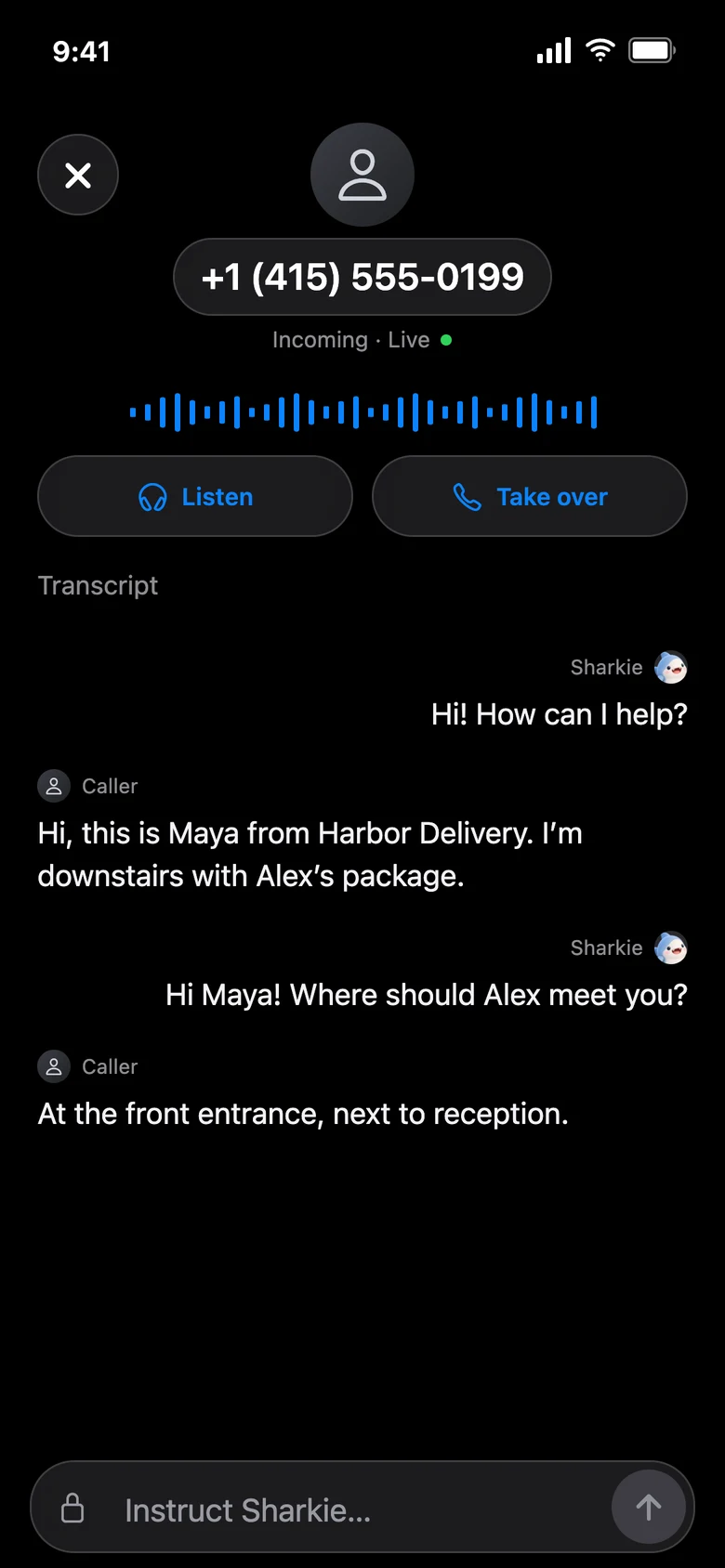
Use Take over for the actual handoff
- Open the active call’s live controls on an eligible enrolled device.
- Choose Take over.
- The assistant is removed and AI-call recording stops before you take over.
- Continue the conversation yourself and provide only information appropriate to that verified interaction.
This replaces the assistant with your participation in the app. It is not a way for the model to transfer the caller to any phone number you name. A call that has already ended no longer has an active takeover action.
Do not route credentials through the assistant
A caller’s claimed company and caller ID are not independent verification. If something feels unexpected, stop and use the business’s trusted contact channel rather than disclosing information just because a caller asks.
Do not send passwords, payment credentials, or one-time security codes in a private instruction for the assistant to repeat. Private instructions guide the AI; they are not a separate secret-verification channel with the business.
The assistant can speak on your behalf without pretending to be a human or the owner. Direct involvement is often the appropriate boundary, not a failure of the workflow.
Remember where the AI record ends
After the call, its saved AI conversation can help you review the context before your takeover. Do not assume that AI transcription or recording continued throughout the part you handled personally: recording stops before the handoff.
If the business confirms an important change, retain whatever confirmation it actually provides through its normal process. A “Completed” call label is not proof of a completed account action. For an information-first example, see phone-only membership requests.