 shibi sharkie
The short answer
Listen keeps your microphone muted. Take over puts you into the conversation after the assistant steps out. A private instruction guides what Sharkie should do next.
Listen: hear the conversation without joining in
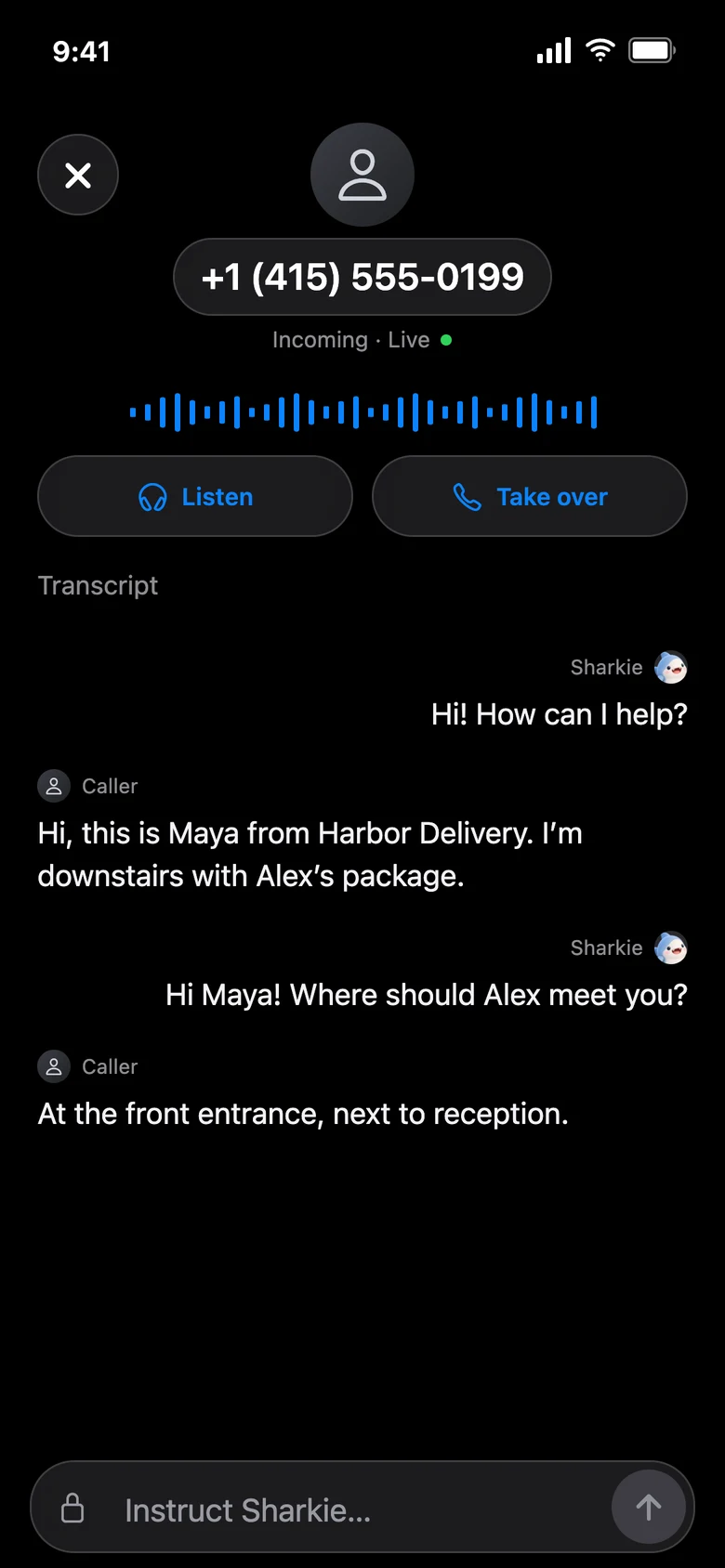
While an eligible call is active, the call card offers live controls. Listening lets you follow the conversation with your microphone muted. It is useful when the caller’s reason becomes important, but you do not want to interrupt.
For example, a repair company may be explaining which part needs replacing. You can hear the detail while the assistant continues handling the conversation. Listening to a live call is different from playing back a recording afterward.
Take over: speak for yourself
Choose Take over when the conversation needs you. The assistant is removed and AI-call recording is stopped before you take over. You are not sending a request for Sharkie to transfer the caller to an arbitrary third-party number.
A business might require you to verify identity directly or approve an account change. This is a sensible time to take over, rather than asking the assistant to impersonate you or invent information.
Live participation depends on a supported enrolled device, permissions, network conditions, and an active call. If the call ends first, the live controls are no longer available.
Guide privately: add the missing detail
A private instruction is an owner-to-assistant message during the call. It is not displayed to the caller as a chat message, but the assistant may use it in its spoken response.
An instruction, not a second conversation
“Ask them to leave the parcel with reception. Do not give out the door code.”
Keep instructions clear and relevant to what is happening now. Do not include passwords, verification codes, or details you would not want repeated accidentally. Private routing is not a promise that AI will never reveal or misunderstand something.
After the call, the useful part stays
When a call completes, the live card becomes a completed-call record and active controls go away. You can revisit the summary, transcript, and available recording in Calls. A filtered call belongs in Spam calls instead of the normal chat summary flow.
If you want an outgoing follow-up, give Sharkie a clear task and a supported U.S. number, or a contact name if you have granted the necessary contact access. Say what needs to be learned or communicated; avoid vague instructions that require guessing a recipient.
Try the prerecorded example first
The app’s labeled delivery-call demo lets you hear example audio and watch a transcript appear. It does not place a real call. You cannot join a prerecorded caller or send it a real private instruction.
That makes the example useful for learning the layout, while the controls on a real eligible active call perform the actual live actions. Read the call history guide for what remains afterward.