 shibi sharkie
The short answer
Start with the reason for the call. Use narrow company or number preferences when that is what you mean, and similar-call filtering when the unwanted purpose is the pattern.
Give an unfamiliar caller a chance to explain
After supported carrier forwarding is set up, incoming calls go directly to Sharkie by default. The assistant can ask what the caller needs, preserve the conversation, and bring you the useful details. You keep your existing personal number; people do not need to learn a new one to reach it.
Compare two calls: “Can I speak to the owner about our lead-generation package?” and “Your package is at reception; where should I leave it?” Both may come from unsaved numbers. Their purposes are very different.
Do not assume an unsaved number is automatically dangerous, or that a familiar number is automatically safe. The conversation supplies useful evidence, but it is not identity verification.
Teach a preference that matches what bothers you
If one company keeps making unwanted sales calls, ask for that company’s sales calls to go to Spam. If you do not want a whole kind of unsolicited pitch, choose Filter similar calls too on a clear example. If only this particular conversation is unwanted, choose Only this call.
Try a clear instruction
“Send unsolicited extended-warranty sales pitches to Spam. Keep calls about a warranty claim I already opened.”
The distinction tells Sharkie the purpose, the boundary, and what should remain useful. A blanket “everything about cars is spam” would be much less helpful.
Check Spam when the stakes are higher
When you are waiting for a clinic, a school, a repair technician, or an application update, review Spam calls as well as your main call list. AI can misunderstand a short, noisy, or incomplete conversation.
You can read the transcript, check the summary, and listen to an available recording before deciding what to do. Restore a misclassified call and adjust the relevant preference if necessary. A missing transcript alone cannot establish that someone was a scammer.
Stay involved when you need to
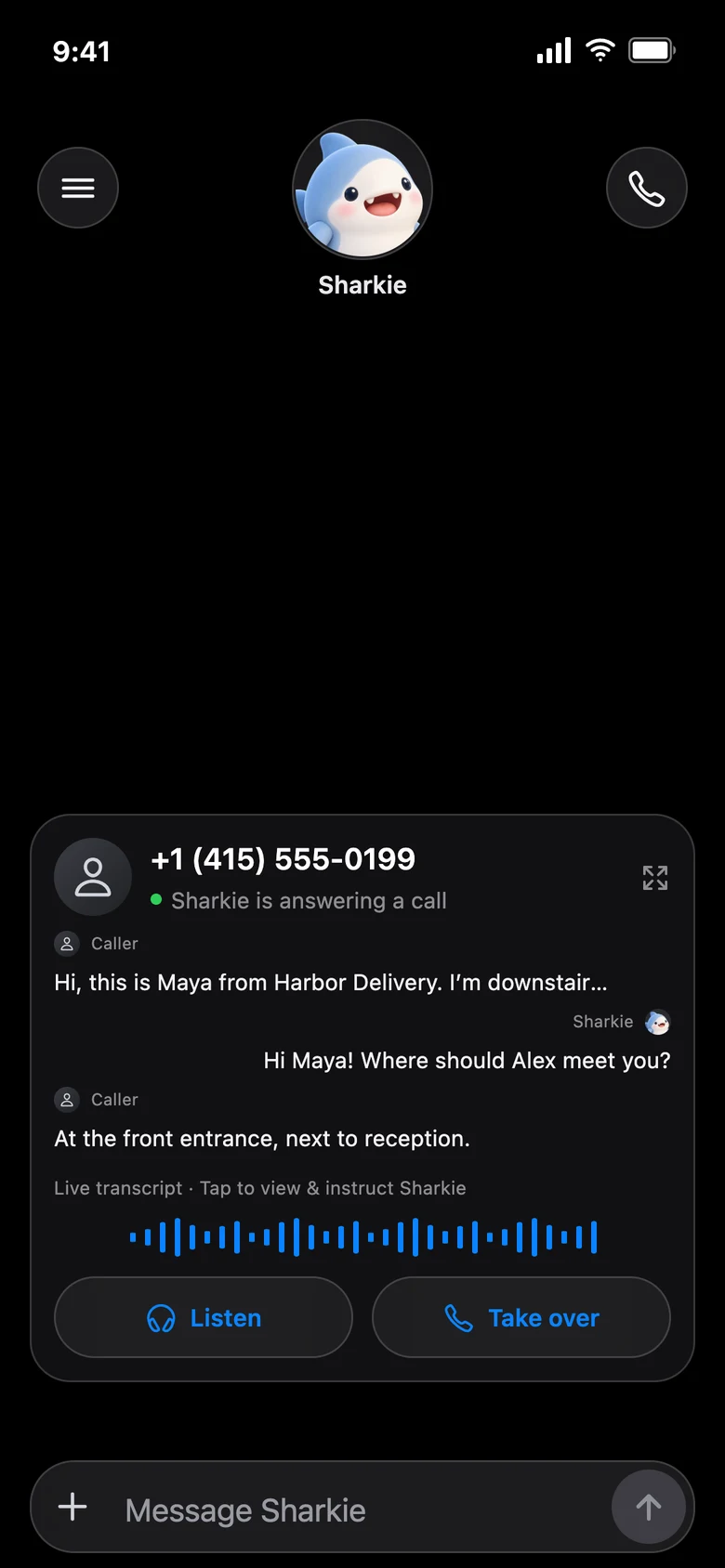
During an eligible active call, you can listen, take over, or send Sharkie a private instruction. For example: “Ask the driver to leave it with reception.” The instruction is not sent to the caller as a chat message, but it can influence what the assistant says.
If you need a personal follow-up, ask Sharkie to call a supported U.S. number and explain the task. Provide the goal and any boundaries, rather than assuming the assistant knows every detail.
What this does not promise
No screening system can guarantee that all important calls are preserved or all unwanted calls are detected. Network availability, carrier forwarding, service limits, and incomplete speech can affect the result. Sharkie is not an emergency service. Keep a separate, reliable plan for urgent or safety-critical calls.
For the mechanics of the different preference types, read how smart spam filtering works.